
This course provides an introduction to the design, deployment, and operation of computer networks. Students will learn the OSI (Open Systems Interconnection) model of network communication, protocols, services, devices, and support methodology of modern networks. The proper use of networking tools will be introduced, as well as the monitoring of network activity, performance and availability issues. Students will learn network hardening techniques and will be able to manage, configure, and troubleshoot wired and wireless network infrastructures. Basic datacenter, cloud, and virtual networking concepts will be introduced. This course prepares students for the CompTIA® Network+ (N10-008) certification exam.
Operational knowledge of PCs, software, and Internet technologies. Strong knowledge of basic networking highly recommended.
Course prefix and number: ITSM 1243
Course Title: Networking Technologies
Credit hours: 3 Credits
Lecture hours: 2
Clinical/Lab hours: 2
Semester: Spring 2026
Catalog description
This course provides an introduction to the design, deployment, and operation of computer networks. Students will learn the OSI (Open Systems Interconnection) model of network communication, protocols, services, devices, and support methodology of modern networks. The proper use of networking tools will be introduced, as well as the monitoring of network activity, performance and availability issues. Students will learn network hardening techniques and will be able to manage, configure, and troubleshoot wired and wireless network infrastructures. Basic datacenter, cloud, and virtual networking concepts will be introduced. This course prepares students for the CompTIA® Network+ (N10-008) certification exam.
Prerequisite:
Operational knowledge of PCs, software, and Internet technologies is required. A strong knowledge of basic networking is highly recommended.
Course Information
Course Outcomes
At the end of this course, students will be able to:
- Explain, create and maintain network documentation.
- Explain the use and the purpose of network services.
- Identify basic datacenter, cloud, and virtual networking concepts.
- Monitor network activity, identifying performance and availability issues.
- Implement network hardening techniques.
- Manage, configure, and troubleshoot network infrastructure.
Topical Outline
- Comparing OSI Model Network Functions
- Compare and Contrast OSI Model Layers
- Configure SOHO Networks
- Deploying Ethernet Cabling
- Summarize Ethernet Standards
- Summarize Copper Cabling Types
- Summarize Fiber Optic Cabling Types
- Deploy Ethernet Cabling
- Deploying Ethernet Switching
- Deploy Networking Devices
- Explain Network Interfaces
- Deploy Common Ethernet Switching Features
- Troubleshooting Ethernet Networks
- Explain Network Troubleshooting Methodology
- Troubleshoot Common Cable Connectivity Issues
- Explaining IPv4 Addressing
- Explain IPv4 Addressing Schemes
- Explain IPv4 Forwarding
- Configure IP Networks and Subnets
- Supporting IPv4 and IPv6 Networks
- Use Appropriate Tools to Test IP Configuration
- Troubleshoot IP Networks
- Explain IPv6 Addressing Schemes
- Configuring and Troubleshooting Routers
- Compare and Contrast Routing Concepts
- Compare and Contrast Dynamic Routing Concepts
- Install and Troubleshoot Routers
- Explaining Network Topologies and Types
- Explain Network Types and Characteristics
- Explain Tiered Switching Architecture
- Explain Virtual LANs
- Explaining Transport Layer Protocols
- Compare and Contrast Transport Protocols
- Use Appropriate Tools to Scan Network Ports
- Explaining Network Services
- Explain the Use of Network Addressing Services
- Explain the Use of Name Resolution Services
- Configure DNS Services
- Explaining Network Applications
- Explain the Use of Web, File/Print, and Database Services
- Explain the Use of Email and Voice Services
- Ensuring Network Availability
- Explain the Use of Network Management Services
- Use Event Management to Ensure Network Availability
- Use Performance Metrics to Ensure Network Availability
- Explaining Common Security Concepts
- Explain Common Security Concepts
- Explain Authentication Methods
- Supporting and Troubleshooting Secure Networks
- Compare and Contrast Security Appliances
- Troubleshoot Service and Security Issues
- Deploying and Troubleshooting Wireless Networks
- Summarize Wireless Standards
- Install Wireless Networks
- Troubleshoot Wireless Networks
- Configure and Troubleshoot Wireless Security
- Comparing WAN Links and Remote Access Methods
- Explain WAN Provider Links
- Compare and Contrast Remote Access Methods
- Explaining Organizational and Physical Security Concepts
- Explain Organizational Documentation and Policies
- Explain Physical Security Methods
- Compare and Contrast Internet of Things Devices
- Explaining Disaster Recovery and High Availability Concepts
- Explain Disaster Recovery Concepts
- Explain High Availability Concepts
- Applying Network Hardening Techniques
- Compare and Contrast Types of Attacks
- Apply Network Hardening Techniques
- Summarizing Cloud and Datacenter Architecture
- Summarize Cloud Concepts
- Explain Virtualization and Storage Area Network Technologies
- Explain Datacenter Network Architecture
Faculty Contact Information
Courtney Stewart
Adjunct Professor
815-295-6605
cstewart@kcc.edu
Paul Carlson
Dean - Business, Technology & Human Services
815-802-8858
pcarlson@kcc.edu
Division Office
W102
815-802-8850
Course Information
At the end of this course, students will be able to:
- Establish network connectivity by deploying wired and wireless devices.
- Explain, create and maintain network documentation.
- Explain the use and the purpose of network services.
- Identify basic datacenter, cloud, and virtual networking concepts.
- Monitor network activity, identifying performance and availability issues.
- Implement network hardening techniques.
- Manage, configure, and troubleshoot network infrastructure.
Comparing OSI Model Network Functions
- Compare and Contrast OSI Model Layers
- Configure SOHO Networks
Deploying Ethernet Cabling
- Summarize Ethernet Standards
- Summarize Copper Cabling Types
- Summarize Fiber Optic Cabling Types
- Deploy Ethernet Cabling
Deploying Ethernet Switching
- Deploy Networking Devices
- Explain Network Interfaces
- Deploy Common Ethernet Switching Features
Troubleshooting Ethernet Networks
- Explain Network Troubleshooting Methodology
- Troubleshoot Common Cable Connectivity Issues
Explaining IPv4 Addressing
- Explain IPv4 Addressing Schemes
- Explain IPv4 Forwarding
- Configure IP Networks and Subnets
Supporting IPv4 and IPv6 Networks
- Use Appropriate Tools to Test IP Configuration
- Troubleshoot IP Networks
- Explain IPv6 Addressing Schemes
Configuring and Troubleshooting Routers
- Compare and Contrast Routing Concepts
- Compare and Contrast Dynamic Routing Concepts
- Install and Troubleshoot Routers
Explaining Network Topologies and Types
- Explain Network Types and Characteristics
- Explain Tiered Switching Architecture
- Explain Virtual LANs
Explaining Transport Layer Protocols
- Compare and Contrast Transport Protocols
- Use Appropriate Tools to Scan Network Ports
Explaining Network Services
- Explain the Use of Network Addressing Services
- Explain the Use of Name Resolution Services
- Configure DNS Services
Explaining Network Applications
- Explain the Use of Web, File/Print, and Database Services
- Explain the Use of Email and Voice Services
Ensuring Network Availability
- Explain the Use of Network Management Services
- Use Event Management to Ensure Network Availability
- Use Performance Metrics to Ensure Network Availability
Explaining Common Security Concepts
- Explain Common Security Concepts
- Explain Authentication Methods
Supporting and Troubleshooting Secure Networks
- Compare and Contrast Security Appliances
- Troubleshoot Service and Security Issues
Deploying and Troubleshooting Wireless Networks
- Summarize Wireless Standards
- Install Wireless Networks
- Troubleshoot Wireless Networks
- Configure and Troubleshoot Wireless Security
Comparing WAN Links and Remote Access Methods
- Explain WAN Provider Links
- Compare and Contrast Remote Access Methods
Explaining Organizational and Physical Security Concepts
- Explain Organizational Documentation and Policies
- Explain Physical Security Methods
- Compare and Contrast Internet of Things Devices
Explaining Disaster Recovery and High Availability Concepts
- Explain Disaster Recovery Concepts
- Explain High Availability Concepts
Applying Network Hardening Techniques
- Compare and Contrast Types of Attacks
- Apply Network Hardening Techniques
Summarizing Cloud and Datacenter Architecture
- Summarize Cloud Concepts
- Explain Virtualization and Storage Area Network Technologies
- Explain Datacenter Network Architecture
Additional Textbook/s and Course Materials
- CompTIA's CertMaster Learn & Labs online environment will be utilized throughout this course
- Student will receive access to Network + eText via the learning environment
- Additional and optional course materials such as the hard copy of the text, CertMaster Practice, and test voucher can be purchased separately if desired.
- The online e-text provides you with the electronic only access to the same resources. You can access these resources on a personal desktop, laptop, smart phone, tablet, etc.
- A PC with Windows 10 or higher along with Internet access is required for successfully working with the materials to complete this course.
- If needed, KCC may be able to lend students Windows laptops for particular tasks for a duration. You may call your program advisor, ITS (815) 802-8900 or Bookstore 815-802-8590 for more information.
Additional Methods of Evaluation
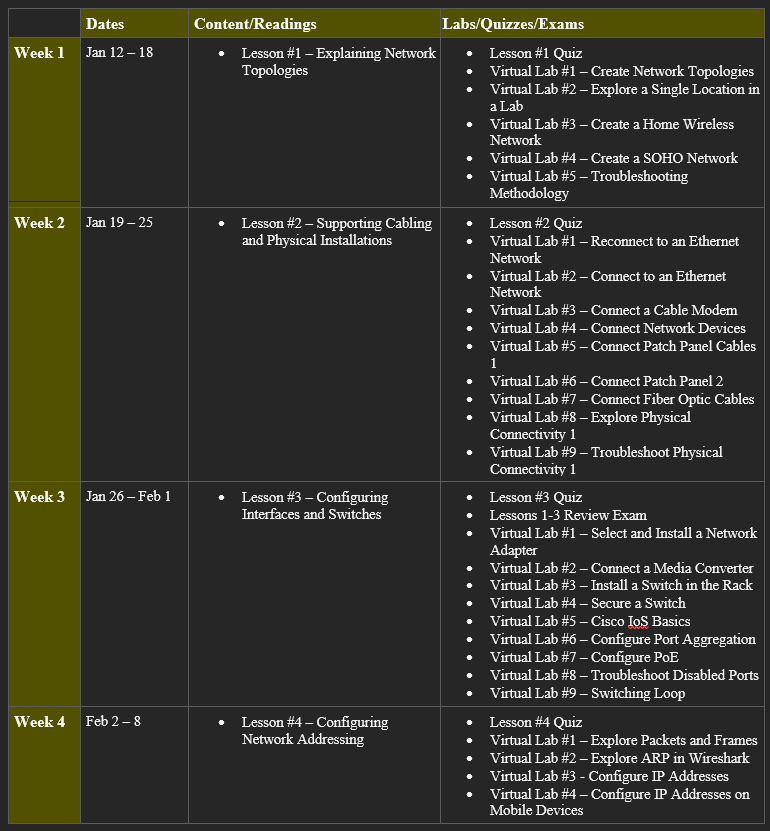
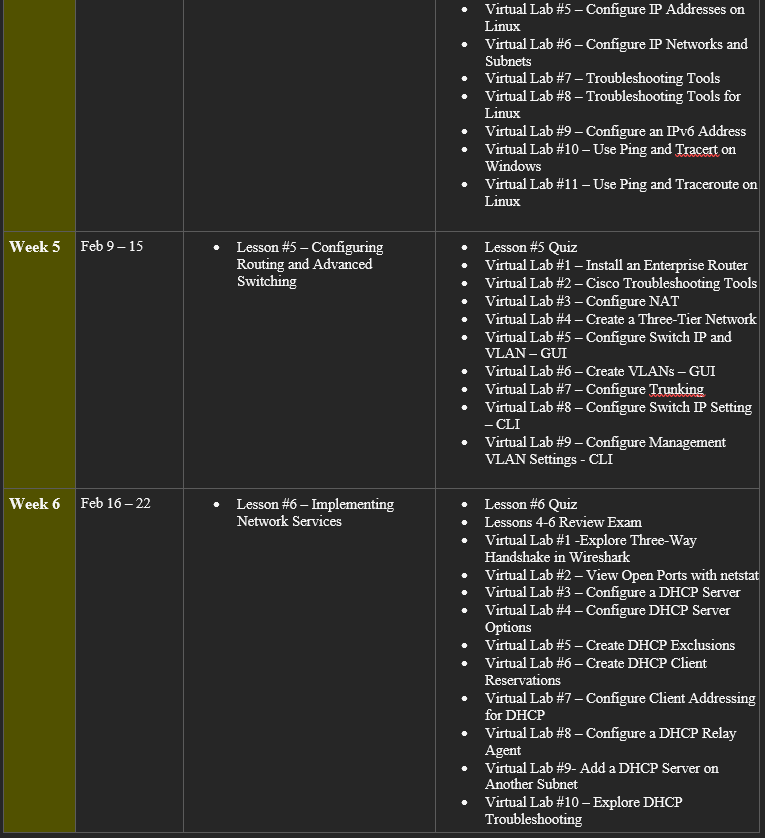
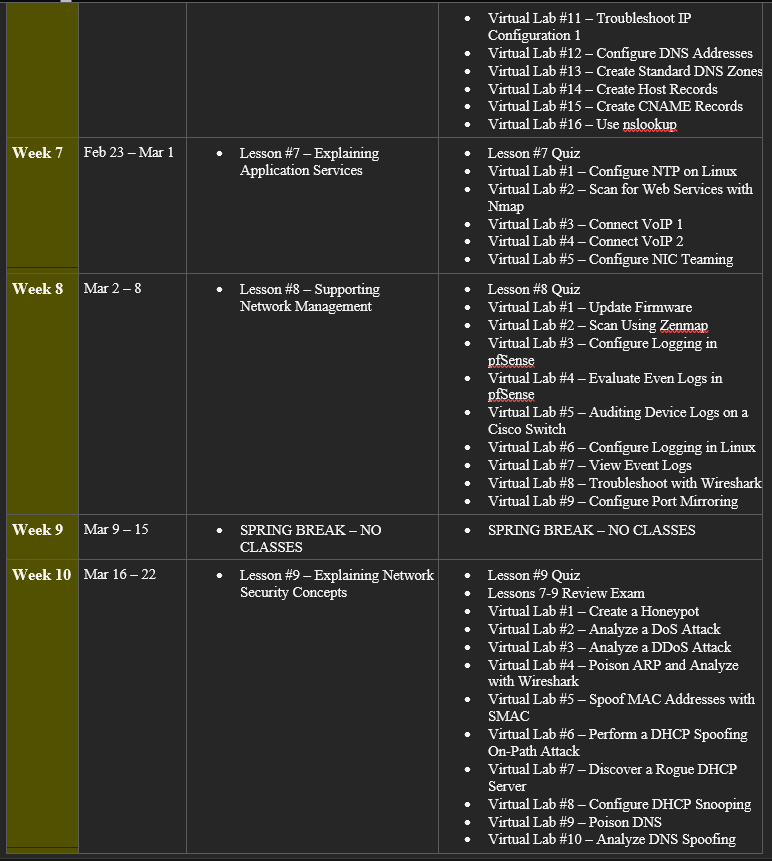
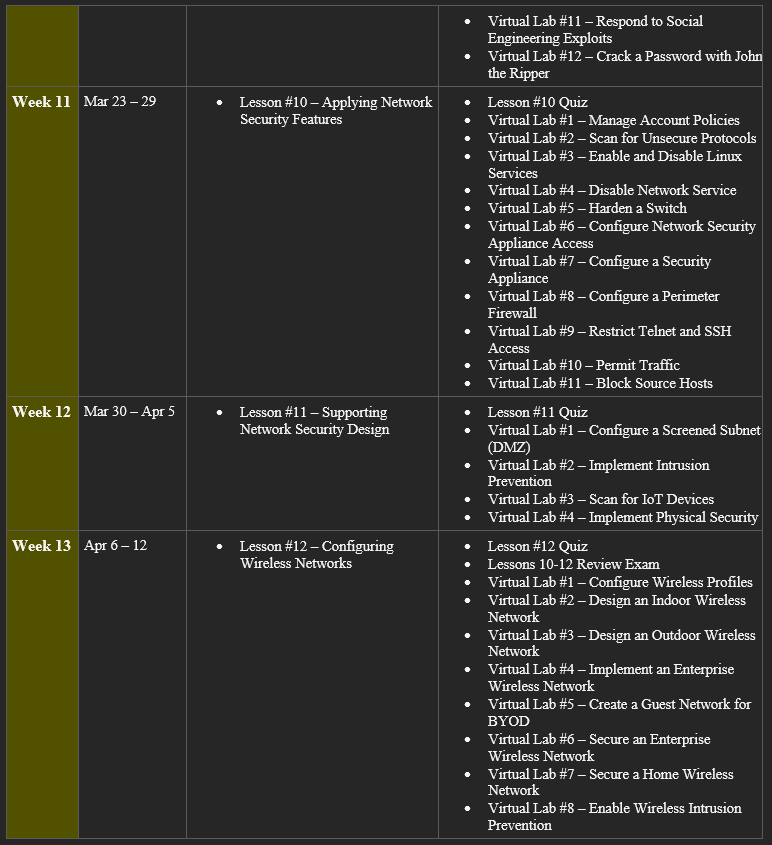
Student evaluation is based on points accrued via Virtual Labs (in CompTIA), Readings, Quizzes, and Exams. Point values may change based on added or removed assignments.
- Readings – 30%
- Labs – 30%
- Quizzes – 20%
- Final Exam – 20%
The corresponding grading scale will be:
- 90-100% = A
- 80-89% = B
- 70-79% = C
- 60-69% = D
- 59% or lower = F
Business, Technology & Human Services
Dean, Paul Carlson; 815-802-8858; V105; pcarlson@kcc.edu; Division Office – W102; 815-802-8650
Course Policies
- Attendance Policy
- Attendance is MANDATORY
- If a class/lab session must be missed, arrangements must be made prior to the absence.
- If an absence is not planned, a valid excuse (i.e., doctor’s note, etc.) must be provided to the instructor for each missed session at the beginning of the following class session.
- Make-up work, including quizzes, exams, etc., is provided at the discretion of the instructor and must be completed within one week of the missed class period.
- Readings
- This course requires you to read the assigned reading from the instructor
- Lectures will provide only an overview of the reading material.
- You are expected to come to class prepared for that day’s lecture
- Quizzes, Labs & Exams
- Primary communication will be via Canvas and email.
- Instructor will respond to messages within 48 hours (weekdays) and grade assignments within one week of submission.
- Students should maintain respectful, professional communication at all times.
- Quizzes are meant to assess your recall and retention of readings and assignments
- Exams are designed to assess retention of lecture and reading materials, while also assessing your ability to compare /contrast and apply concepts.
- On face-to-face quiz and exam days, students must arrive on time and be ready to take the quiz or exam at the start of class.
- If a student enters the classroom late on a quiz day, he/she may take the quiz as long as at least one student is still in possession of the quiz. If all students have completed and turned in the quiz, he/she may not take the quiz.
- Students will not be permitted to enter the classroom and take the exam once the exam has started.
- Once an exam or quiz has been administered, a student will not be permitted to leave for any reason until he/she turns the exam in.
- If a student’s cell phone is disruptive during an exam or quiz, the student will receive a zero on that exam.
- If a student is found using their cell phone in any way during an exam or quiz, it will be considered to be a case of cheating and the student will receive a zero on the exam as well as the possibility of receiving an F for the course grade.
- Late assignments will not be accepted unless arrangements are made
- Cell Phone Use
- Turn off all cell phones and all other items that may beep, buzz, or otherwise interrupt the instructor and other students.
- If you must have your cell phone on for work or a family emergency, set it to vibrate and leave the classroom if you receive a call.
- No texting during class.
- Failure to follow any of the above rules will result in a warning (first offense), 5 point deduction from your class grade (second offense), and removal from the class period (third and beyond offense).
- Artificial Intelligence (AI) Use
- Students must obtain permission from the instructor before using AI composition software / AI writing tools / AI tools (such as ChatGPT) for any assignments in this course.
- Using these tools without the instructor’s permission places your academic integrity at risk.
- If AI tools are used, students are expected to demonstrate transparency and provide appropriate citations for any AI-generated content included in their work.
- Other Classroom Guidelines
- Use respectful, professional language in all discussions and emails.
- Avoid using ALL CAPS, slang, or inappropriate language.
- When replying to peers, provide constructive feedback.
- You will gain the most from this course if you actively participate in classroom discussions and share your experiences and questions.
- Learn the names of your classmates and help one another whenever possible (but not during quizzes and exams).
- Take responsibility for the classroom and lab areas by picking up after yourself.
- Arrive promptly before class begins.
- No tobacco products may be used on campus.
- Do not come to class when you are ill and likely to infect others.
- Minor children are not allowed in the classroom or lab areas for safety reasons.
- No students will be allowed to work in lab areas outside of class time without instructor permission and appropriate supervision.
- Student Integrity
- All students are expected to take quizzes, exams, write papers, and conduct themselves with integrity, common sense, and respect for their fellow students, the instructor, and the academic institution.
- Students should not jeopardize their own honesty or that of other students.
- Cheating will not be tolerated.
- Upon evidence of student cheating, the student will be dropped from the course and receive a grade of F in the course
College Policies, Resources and Supports
College Policies
For information related to the Student Code of Conduct Policy, Withdrawal Policy, Email Policy, and Non-Attendance/Non-Participation Policy, please review the college’s Code of Campus Affairs and Regulations webpage, which can be found at.
Resources
KCC offers various academic and personal resources for all students. Many services are offered virtually, as well as in person. Please visit to access student resources services such as:
- Clubs and organizations
- Counseling and referral services
- Office of disability services
- Student complaint policy
- Transfer services
- Tutoring services, etc.
Copyright and Syllabus Disclaimer
The materials on this course are only for the use of students enrolled in this course for purposes associated with this course. Further information regarding KCC's copyright policy is available at https://kcc.libguides.com/copyright.
College Policies, Resources and Supports
For information related to the Student Code of Conduct Policy, Withdrawal Policy, Email Policy, and Non- Attendance/Non-Participation Policy, please review the college’s Code of Campus Affairs and Regulations webpage, which can be found at catalog.kcc.edu under the Academic Regulations & Conduct Guide.
KCC offers various academic and personal resources for all students. Many services are offered virtually, as well as in person. Please visit Student Resources - Kankakee Community College to access student resources services such as:
- Clubs and organizations
- Counseling and referral services
- Office of disability services
- Student complaint policy
- Transfer services
- Tutoring services, etc.
The materials on this course are only for the use of students enrolled in this course for purposes associated with this course. Further information regarding KCC's copyright policy is available at https://kcc.libguides.com/copyright.
|Course syllabus/calendar is subject to change.